Membership in Pléthore allows your customers to subscribe to a plan offered by your chain in exchange for a recurring fee.
When a customer becomes a member, they gain access to exclusive benefits defined by you that are not available to regular customers. These benefits can include:
Access to private events
Special discounts or dedicated offers
Credit to spend on your services
Dedicated slots time in your venues
From the dashboard, you can manage membership requests, payments, active members, and exclusive events.
In short, the Membership feature helps you structure and control your loyalty or subscription strategy in one centralized place.
To better organize your offering, Pléthore allows you to create:
Membership Programs
A membership program is a global structure that groups together several plans. You can create different programs depending on your business needs (for example by location).
Membership Plans
Inside each program, you can create multiple subscription plans. Each plan can have a different price and different benefits to target different types of customers with tailored offers.
At a high level, the process works like this:
Customer fills in the form → Payment details are entered → Admin reviews the request → Payment is finalized → Member account is created.
Below is the detailed step-by-step explanation:
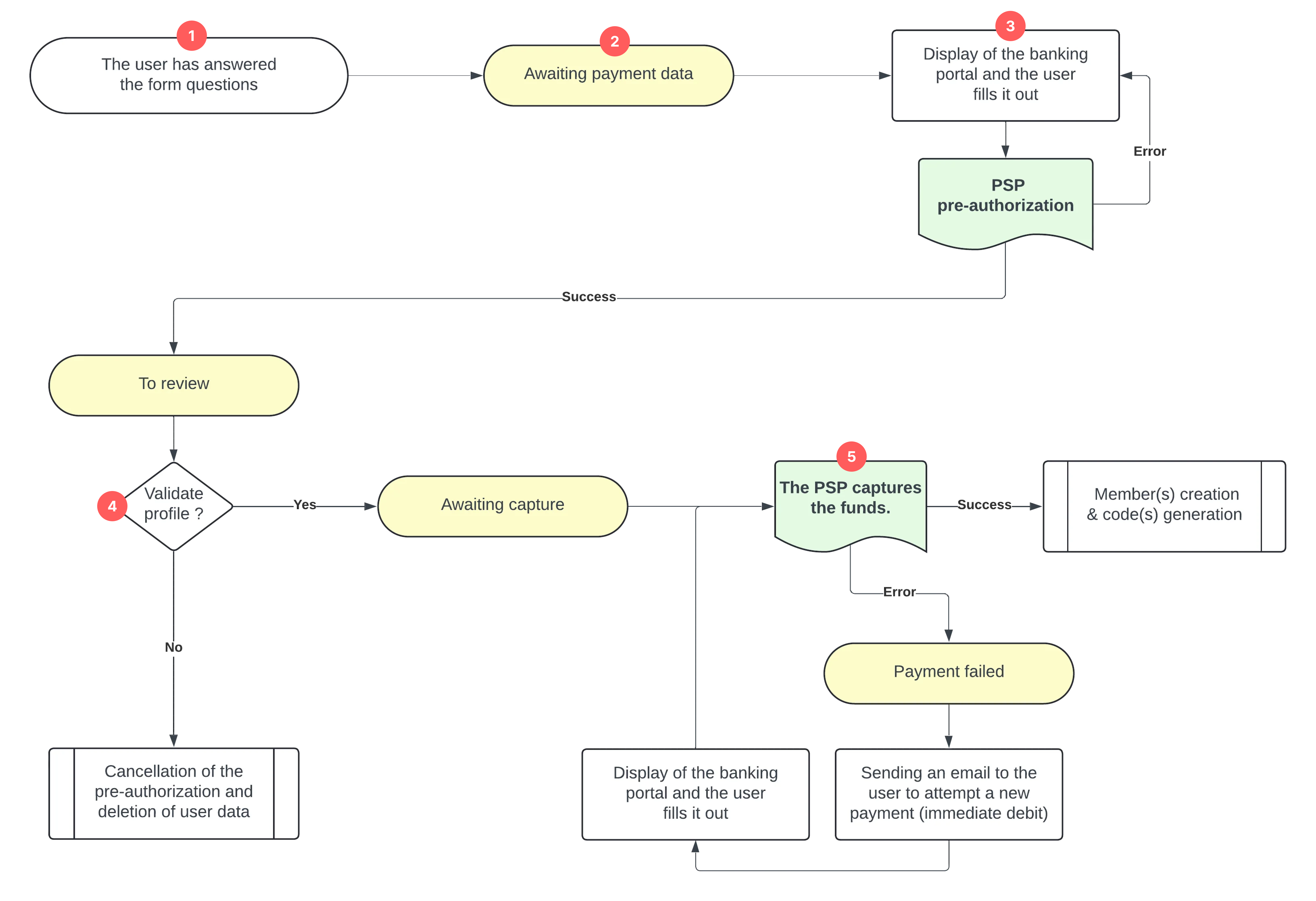
(1) User Completes the Membership Form
The user fills in all required fields in a multi-step form (such as contact information, interests, family details, etc.). At this stage, the request does not yet appear in the dashboard.
(2) User Enters in Payment Step
In the final step of the form, the user is asked to enter their payment details (card information).
As soon as the user reaches this payment step (they have not submitted the payment yet), the request appears in the dashboard under the request list with the status Awaiting payment data, meaning the system is waiting for the user to complete and submit their payment information.
(3) User Submits Payment Details
When the user submits their payment information successfully, the system sends a request to the Payment Service Provider (PSP).
At this stage, the PSP performs a pre-authorization, meaning the system temporarily reserves the payment amount on the user’s card. The money is not taken yet, it is only reserved to ensure that funds are available.
After this step, the dashboard status changes to To Review. This means the payment method is valid, and the request is now waiting for admin validation.
(4) Admin Reviews the Request
An administrator reviews the membership application and verifies the user’s information.
The admin has two options:
If the request is rejected, the pre-authorization is cancelled (the reserved amount is released), and the user’s data is deleted from the system.
If the request is approved, the status changes to Awaiting capture. It means the system is ready to finalize the payment and collect the reserved amount.
(5) PSP Captures the Payment
The PSP now attempts to capture the payment: The system officially withdraws the reserved funds from the user’s card. There are two possible outcomes:
If the capture is successful, the member profile is created in the Members tab in the dashboard and an activation code is generated.
If the capture fails, the status changes to Payment failed.
In case of failure, the user automatically receives an email notifying them that the payment attempt was unsuccessful. The email includes a link allowing them to return to the payment page and provide a new payment method.
Once the user submits new payment details and the funds are successfully captured, the process continues normally.

