The membership renewal feature allows users to continue their membership by renewing their subscription when the current billing period ends.
Renewals are handled automatically by the platform through a daily background process. Each day, the system checks all subscriptions and determines whether they should be renewed, updated, or cancelled, depending on their status and the rules of the membership plan.
Understanding how this process works helps administrators anticipate subscription changes and better manage membership plans.
This article explains:
The different subscription statuses
The steps the system follows when processing automatic subscription renewals
Each subscription has a status that determines how it is handled during the renewal process. The platform currently uses four main statuses:
Active: The subscription is active and the member currently has access to their membership benefits.
To cancel: The subscription is scheduled to be cancelled at the end of the current billing period. When the renewal date is reached, the system will automatically cancel the subscription.
Failed to renew: The system attempted to renew the subscription, but the payment failed.
When this happens, membership benefits are temporarily disabled and the member can update their payment method and retry the payment. Once the payment succeeds, the subscription becomes active again.
Cancelled: The subscription has been permanently cancelled and the member no longer has access to the membership.

Every day, the system runs a background job that reviews all subscriptions in the platform. This process ensures that subscriptions are renewed or cancelled at the correct time without manual intervention. The system follows the steps below:
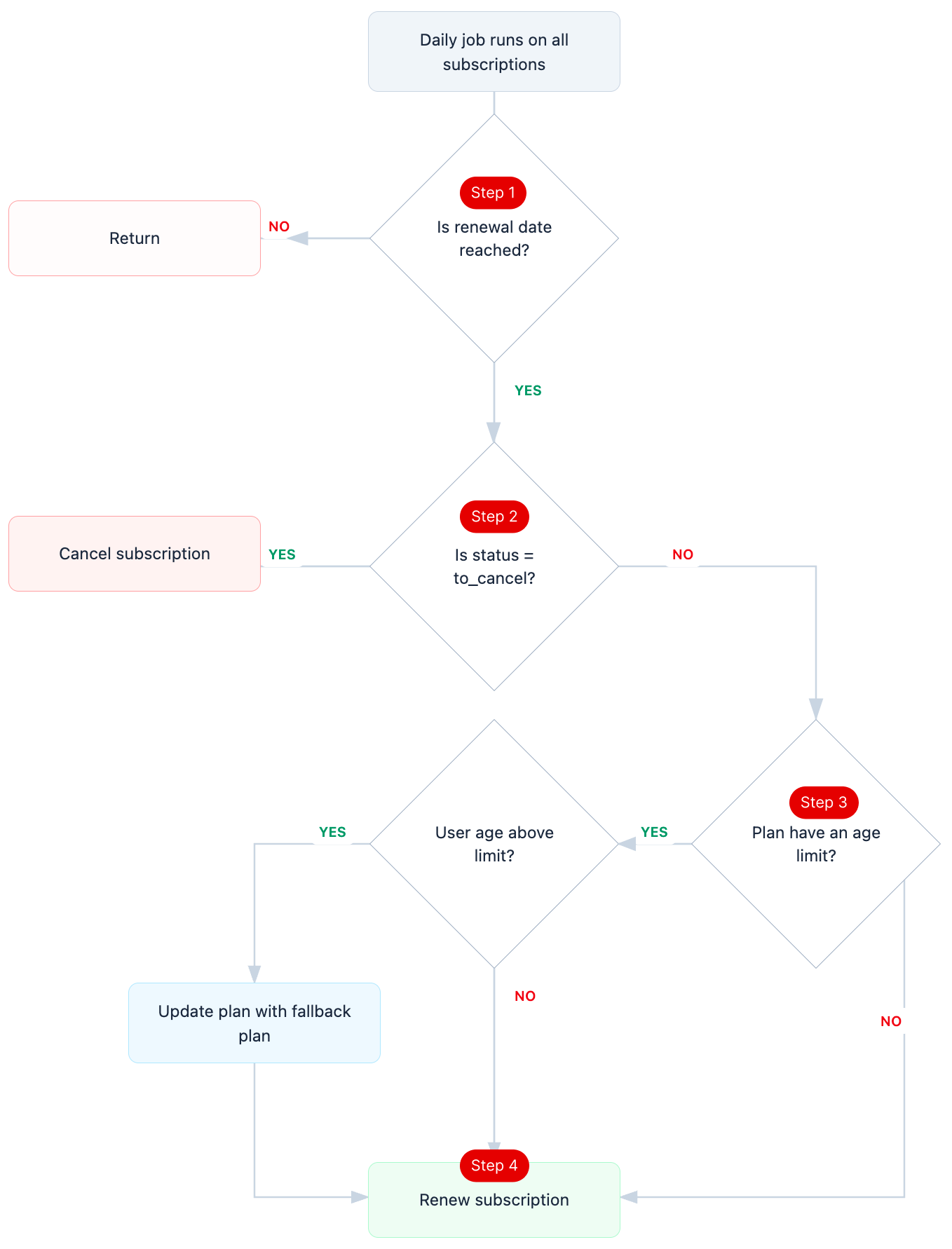
Step 1: Check the renewal date
The system first checks whether the subscription renewal date has been reached.
If the renewal date has not yet been reached, no action is taken and the subscription remains unchanged.
If the renewal date has been reached, the system proceeds to the next step to determine whether the subscription should be renewed or cancelled (step 2).
Step 2: Check the subscription status
Once the renewal date is reached, the system verifies the current subscription status.
If the status is To cancel, the subscription is automatically cancelled and the renewal process stops.
If the status is Active, the system continues to the next step to evaluate the membership plan rules (step 3).
Step 3: Check the membership plan rules
When the subscription status is active, the system verifies the rules defined in the membership plan.
Some membership plans include specific eligibility conditions, such as age restrictions. For example, certain plans may only apply to members within a specific age range.
If the member still meets the eligibility conditions, the system continues with the renewal process (step 4).
If the member no longer meets the conditions, the system automatically switches the subscription to the fallback plan defined in the membership configuration. The renewal process then continues using that fallback plan (step 5).
Step 4: Attempt the subscription renewal
After verifying the plan rules, the system attempts to renew the subscription by charging the member’s saved payment method. Two outcomes are possible:
If the payment succeeds, the subscription is renewed and the status remains Active. The next billing period begins immediately.
If the payment fails, the subscription status becomes Failed to renew. In this case, the member can access the payment page to update their payment method and retry the payment until it succeeds.
